












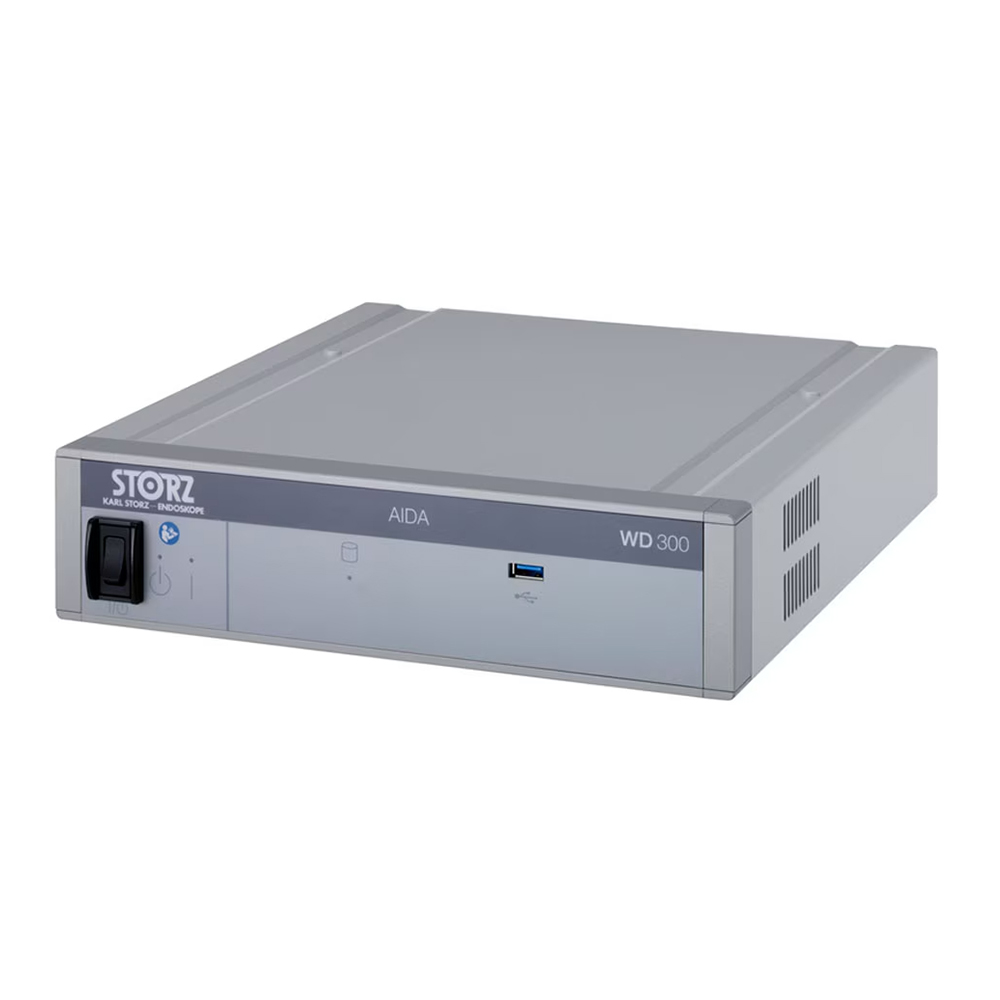

Karl Storz AIDA HD Connect Documentation System with SmartScreen – Surgical Workflow and Archiving
Camjoy proudly offers the Karl Storz AIDA HD Connect Documentation System, the benchmark for integrated surgical video and still image management in the modern Operating Room (OR). More than just a simple recorder, the AIDA HD Connect is a sophisticated Medical Archiving Device designed to seamlessly integrate with Storz imaging platforms (like Image 1) and your hospital’s IT infrastructure. Featuring a built-in SmartScreen touch interface and a versatile DVD recorder for secure, physical backups, this refurbished unit delivers reliable, high-definition patient documentation, crucial for legal compliance, EMR integration, and surgical training.
The AIDA HD Connect revolutionizes the OR workflow by centralizing image capture and patient data in one device. Its key function is to bridge the gap between surgical imaging (endoscopy) and clinical data management (EMR/PACS), ensuring every critical moment is documented and securely stored with minimal disruption to the surgical team.
Advanced Features and Operational Workflow
The AIDA system is built around efficiency and quality documentation. It is capable of capturing full 1080p video footage and high-resolution still images directly from the endoscopic camera system, ensuring that the documented output reflects the high quality of the surgical view.
1. HD Documentation and Archiving
The AIDA HD Connect captures video in universally recognized formats, making playback and editing simple.
- Full 1080p HD Recording: Captures uncompressed or minimally compressed video for superior clinical detail.
- Seamless Integration: Automatically detects Storz camera events (e.g., foot pedal capture) to start/stop recording and image capture.
- Multiple Export Options: Includes internal hard drive storage, USB ports for quick drive transfer, and a built-in DVD/CD drive for physical, legally compliant backups (a key feature for long-term archiving).
2. SmartScreen and Intuitive Interface
The front-mounted SmartScreen is a crucial component, providing the surgical staff with immediate visual feedback and control.
- Touch-Enabled Interface: Simplifies patient data entry, case selection, and media management through a user-friendly touch menu.
- Live Preview: Allows the scrub nurse or tech to verify the recorded content quality immediately, reducing the risk of lost documentation.
- Patient Data Management: Enables the pre-loading or rapid entry of patient demographics (via keyboard/barcode reader) and links all media directly to the patient record.
3. Network Connectivity and EMR/PACS Integration
The “Connect” element of the AIDA system highlights its superior networking capabilities, which are essential for modern hospital environments.
- DICOM/HL7 Compatibility: Fully compatible with medical data standards, allowing documented images and videos to be pushed directly to the PACS (Picture Archiving and Communication System) or EMR (Electronic Medical Record).
- Surgical Streaming: Capable of outputting live video streams over the network for teleconferencing, remote consultation, or viewing in nearby lecture halls.
- Centralized Archiving: Supports automated data transfer to hospital servers, ensuring backups are managed centrally and securely.
Clinical & Operational Benefits
Investing in the Karl Storz AIDA HD Connect provides multiple returns on investment beyond simple video capture.
- Legal Compliance: Securely archived HD video and images provide irrefutable evidence for medicolegal purposes and documentation standards.
- Improved Training: High-quality video is invaluable for residency training, peer review, and continuous surgical education.
- Enhanced Patient Education: Visual media can be used by physicians to explain procedures, outcomes, and anatomy to patients and families.
- Workflow Optimization: Eliminates the need for multiple, separate recording devices, simplifying the OR setup and reducing cross-contamination risk.
The robustness and versatility of the AIDA platform solidify its status as a cornerstone technology in integrated operating rooms worldwide. Unlike consumer-grade recording solutions which lack the necessary data protocols and input/output diversity, the AIDA is purpose-built for the high-demand, sterile environment of surgery. Its ability to accept numerous video inputs (SDI, DVI, Composite) and output DICOM-compliant files makes it future-proof and adaptable across varying tower configurations. The internal processing unit is optimized not just for storage, but for tagging, labeling, and organizing files instantaneously, which is a key differentiator from simple digital video recorders. This level of digital asset management ensures that clinical teams can retrieve specific case documentation years down the line, meeting stringent hospital accreditation and regulatory demands.
Furthermore, the integrated DVD drive is a practical inclusion in an increasingly digital world. While network archiving is standard, many smaller clinics and international facilities still rely on physical media for redundant backups or portable case files. The AIDA facilitates this critical function seamlessly. The SmartScreen, with its durable, easy-to-clean surface, stands up to the rigorous cleaning protocols of the OR, proving that the system was designed from the ground up for medical utility, not repurposed from general IT hardware. This combination of ruggedness, connectivity, and data intelligence makes the refurbished AIDA HD Connect system from Camjoy a truly intelligent investment for any facility looking to solidify its digital OR capabilities without the cost of a brand-new tower integration.
Technical Specifications (Core Data for Procurement)
| Manufacturer / System | Karl Storz / AIDA HD Connect |
|---|---|
| Primary Function | Surgical Archiving, Documentation, and Patient Data Management |
| Video Resolution | SD to FULL HD (1920x1080p) Input/Recording |
| User Interface | Integrated SmartScreen Touch Display |
| Data Protocols | DICOM, HL7, FTP |
| Internal Storage | High-capacity Hard Drive (Specific capacity varies) |
| External Archiving | Internal DVD/CD Drive, USB Ports (for USB drives) |
| Input/Output | DVI, SDI, S-Video, Composite |
Camjoy Refurbishment: Digital System Integrity
The AIDA HD Connect is a sophisticated digital recording device. Our refurbishment process focuses intensely on restoring its electronic and software integrity.
- Hard Drive & Data Integrity Check: The internal hard drive is securely wiped and tested for sector errors. We ensure maximum internal storage reliability.
- SmartScreen Calibration: The touch interface is calibrated for immediate, accurate responsiveness, and the screen is checked for pixel integrity.
- DVD Drive Functionality: The internal DVD/CD drive is tested for read/write accuracy on various media types to guarantee reliable physical backups.
- Network Connectivity Validation: Ethernet ports and internal network cards are validated to ensure flawless DICOM/HL7 data transfer to PACS/EMR systems.
Trust Camjoy to deliver a refurbished Karl Storz AIDA HD Connect that performs to factory specifications, providing the reliability necessary for managing crucial patient data.
Frequently Asked Questions (FAQ) – Addressing Connectivity & Usage
Is the AIDA HD Connect compatible with non-Storz camera systems?
Yes. While designed for integration with Karl Storz components, the AIDA HD Connect features standard video inputs (SDI, DVI, etc.). As long as the non-Storz camera system outputs a standard video signal that matches the AIDA’s input capabilities, it can be used for recording and documentation.
How does the AIDA system integrate with our hospital’s EMR?
The AIDA uses the industry-standard DICOM and HL7 protocols. This allows the system to send captured video clips and still images directly to your hospital’s PACS/VNA (Vendor Neutral Archive) and link the media files to the correct patient chart in the EMR, typically via a worklist setup.
What types of media can the DVD drive use for backup?
The integrated drive is generally compatible with standard CD-R, CD-RW, DVD-R, and DVD+R formats. This provides a secure, physical backup method for long-term archiving, which is critical for meeting certain state and national medical record retention requirements.
Does Camjoy provide the necessary networking setup instructions?
Yes. We provide complete operational manuals and can offer guidance on the physical connections. However, actual network configuration (assigning IP addresses, configuring firewall rules, and setting up DICOM nodes) must be done by the client’s local IT or biomedical department to ensure security compliance.